Showing posts with label Reactive Cloud Actor. Show all posts

Wednesday, 11 June 2014

BeeHive Series - Part 3: BeeHive 0.5, RabbitMQ and more

Level [T4]

BeeHive is a friction-free library to do Reactor Cloud Actors - effortlessly. It defines abstractions for the message, queue and the actors and all you have to do is to define your actors and connect their dots using subscriptions. If it is the first time you read about BeeHive, you could have a look at previous posts but basically a BeeHive Actor (technically Processor Actor) is very simple:
[ActorDescription("TopicName-SubscriptionName")]
public class MyActor : IProcessorActor
{
  public Task<IEnumerable<Event>> ProcessAsync(Event evnt)
  {
    // impl
  }
}
All you do is to consume a message, do some work and then return typically one, sometimes zero and rarely many events back.
A few key things to note here.

Event

First of all Event, is an immutable, unique and timestamped message which documents a significant business event. It has a string body which normally is a JSON serialisation of actual message object - but it does not have to be.

So usually messages are arbitrary bytes, why here it is a string? While it was possible to use byte[], if you need to send binary blobs or you need custom serialisation, you are probably doing something wrong. Bear in mind, BeeHive is targeted at solutions that require scale, High Availability and linearisation. If you need to attach a big binary blob, just drop it in a key value store using IKeyValueStore and put the link in your message. If it is small, use Base64 encoding. Also your messages need to very simple DTOs (and by simple I do not mean small, but a class with getters and setters), if you are having problem serialising them then again, you are doing something wrong.

Queue naming

BeeHive uses a naming conventional for queues, topics and subscriptions. Basically it is in the format of TopicName-SubscriptionName. So there are a few rules with this:
  • Understandably, TopicName or SubscriptionName should not contain hyphens
  • If the value of TopicName and SubscriptionName is the same, it is a simple queue and not a publish-subscribe queue. For example, "OrderArrived-OrderArrived"
  • If you leave off the SubscriptionName then you are referring to the topic. For example "OrderArrived-".
Queue name is represented by the class QueueName. If you need to construct queue names using static methods:

var n1 = QueueName.FromSimpleQueueName("SimpleQ"); // "SimpleQ-SimpleQ"
var n2 = QueueName.FromTopicName("Topic"); // "Topic-"
var n3 = QueueName.FromTopicAndSubscriptionName("topic", "Sub"); // "Topic-Sub"

There is a QueueName property on the Event class. This property defines where to send the event message. The queue name must be the name of the topic or simple queue name.

IEventQueueOperator

This interface got some make over in this release. I have not been happy the interface as it had some inconsistencies - especially in terms of creating . Thanks to Adam Hathcock who reminded me, now this is done.

With QueueName ability of differentiating topics and simple queue, this value needs to be either name of the simple queue (in the example above "SimpleQ") or the conventional topic name (in the example above "Topic-").

So here is the interface(s) as it stands now:

public interface ISubscriptionOperator<T>
{
    Task<PollerResult<T>> NextAsync(QueueName name);
    Task AbandonAsync(T message);
    Task CommitAsync(T message);
    Task DeferAsync(T message, TimeSpan howLong);
}

public interface ITopicOperator<T>
{
    Task PushAsync(T message);
    Task PushBatchAsync(IEnumerable<T> messages);
}

public interface IQueueOperator<T> : ITopicOperator<T>, ISubscriptionOperator<T>
{
    Task CreateQueueAsync(QueueName name);
    Task DeleteQueueAsync(QueueName name);
    Task<bool> QueueExists(QueueName name);
}

public interface IEventQueueOperator : IQueueOperator<Event>
{
}
Main changes were made to IQueueOperator<T> passing the QueueName which made it simpler.

RabbitMQ Roadmap

BeeHive targets cloud frameworks. IEventQueueOperator and main data structures have been implemented for Azure. Next is AWS.

Amazon Web Services (AWS) provides Simple Queue Service (SQS) which only supports simple send-receive scenarios and not Publish-Subscribe cases. With this in mind, it is most likely that other message brokers will be used although a custom implementation of pub-sub based on Simple Notification Service (SNS) has been reported. Considering RabbitMQ is by far the most popular message broker out there (is it not?) it is sensible to pick this implementation first.

RabbitMQ client for .NET has a very simple API and working with it is very easy. However, the connection implementation has a lot to be desired. EasyNetQ has a sophisticated connection implementation that covers dead connection refreshes and catering for round-robin in case of High-Availability scenario. Using a full framework to just the connection is not really an option hence I need to implement something similar.

So for now, I am realising an alpha version without the HA and connection refresh to get community feedback. So please do ping me what you think.

Since this is a pre-release, you need to use -Pre to get it installed:

PM> Install-Package BeeHive.RabbitMQ -Pre

Monday, 2 June 2014

BeeHive Series - Part 2 - Importing file from blob storage to ElasticSearch sample

[Level T1]

In the previous post, we introduced BeeHive and talked about an example usage where we check news feeds and send a notification if a keyword is found. In this post, we look at another example. You can find the source code in the BeeHive Github repo. Just open up BeeHive.Samples.sln file.

Processing files

Let's imagine we receive files in a particular blob location and we need to import/process them into the system. These files arrive in a particular folder structure and we need to watch the root folder. Then we need to pick them up, extract each row and send each record to be processed - in this case to be loaded onto an ElasticSearch cluster.
ElasticSearch is a horizontally-scalable and highly-available indexing and search technology. It runs on Windows, Linux and OSX, easy to setup and free to use. You can download the installer from http://www.elasticsearch.org/

NewFileArrived

So here, we design a system that watches the location and when it finds the files, it raises NewFileArrived event. This is a simple enough process yet what if we have multiple actors watching the location (very likely for a cloud scenario where the same process runs on many machines)? In this case we will receive multiple NewFileArrived events.
BeeHive provides pulsers that help you with your concurrency problems. FolderWatcherActor can subscribe to a topic that is fed by a pulser. In fact, in a BeeHive world, you could have pulsers that raise events at different intervals and raise events such as FiveMinutesPassed, AnHourPassed, ADayPassed, etc and based on the requirement, your actors could be subscribing to any of these. Beauty ofmessage-based scheduling is that only a single instance of the actor will be receiving the message.
Raising the NewFileArrived event is not enough. When the actor wakes up again by receiving the next message and the file is there, it will send another NewFileArrived error. We can protect against this by:
1) Making processing Idempotent 2) Keep track of files received 3) Mark files by creating a status file next to them
We choose the last option so we can use the same status file further down. So after identifying the file, we create a file with the same name plus .status and write the status number, here 1.

public async Task<IEnumerable<Event>> ProcessAsync(Event evnt)
{
    var events = new List<Event>();
    var items = (await _dynamoStore.ListAsync(
        _configurationValueProvider.GetValue(Constants.SweepRootPathKey)))
        .ToArray();

    var notProcessed = items.Where(x => !x.IsVirtualFolder)
        .GroupBy(z => z.Id.Replace(Constants.StatusPostfix, ""))
        .Where(f => f.Count() == 1)
        .Select(w => w.Single());

    foreach (var blob in notProcessed)
    {
        events.Add(new Event(new NewFileArrived()
        {
            FileId = blob.Id
        }));
        await _dynamoStore.InsertAsync(new SimpleBlob()
        {
            Id = blob.Id + Constants.StatusPostfix,
            Body = new MemoryStream(BitConverter.GetBytes(1)) // status 1
        });
    }

    return events;
}

Process the file: fan-out the records

After receiving the NewFileArrived, we copy the file locally and split the file to the records and fan out the records with ImportRecordExtracted. We also send a ImportFileProcessed event.
public async Task<IEnumerable<Event>> ProcessAsync(Event evnt)
{
    var newFileArrived = evnt.GetBody<NewFileArrived>();
    var blob = await _dynamoStore.GetAsync(newFileArrived.FileId);
    var reader = new StreamReader(blob.Body);
    string line = string.Empty;
    var events = new List<Event>();
    while ((line = reader.ReadLine())!= null)
    {
        var fields = line.Split(new []{','},StringSplitOptions.RemoveEmptyEntries);
        events.Add(new Event( new ImportRecordExtracted()
        {
            Id = fields[0],
            Content = fields[2],
            IndexType = fields[1]
        }));
    }

    events.Add(new Event(new ImportFileProcessed()
    {
        FileId = newFileArrived.FileId
    }));

    return events;
}

ImportFileProcessed

The actor receiving this event will delete the file and the status file.
public async Task<IEnumerable<Event>> ProcessAsync(Event evnt)
{
    var importFileProcessed = evnt.GetBody<ImportFileProcessed>();
    var statusFile = importFileProcessed.FileId + Constants.StatusPostfix;

    await _dynamoStore.DeleteAsync(new SimpleBlob()
    {
        Id = importFileProcessed.FileId
    });
    await _dynamoStore.DeleteAsync(new SimpleBlob()
    {
        Id = statusFile
    });

    return new Event[0];
}

ImportRecordExtracted

Based on the type of the record, we "upsert" the record in the appropriate index in our ElasticSearch cluster.
public async Task> ProcessAsync(Event evnt)
{
    var importRecordExtracted = evnt.GetBody();
    var elasticSearchUrl = _configurationValueProvider.GetValue(Constants.ElasticSearchUrlKey);

    var client = new HttpClient();
    var url = string.Format("{0}/import/{1}/{2}", elasticSearchUrl,
        importRecordExtracted.IndexType,
        importRecordExtracted.Id);
    var responseMessage = await client.PutAsJsonAsync(url, importRecordExtracted);

    if (!responseMessage.IsSuccessStatusCode)
    {
        throw new ApplicationException("Indexing failed. " 
            + responseMessage.ToString());
    }

    return new[]
    {
        new Event(new NewIndexUpserted()
        {
            IndexUrl = url
        }) 
    };
}

NewIndexUpserted

While we currently do not need to know when we add or update an index in the ElasticSearch, this can later be used by other processes, so it is best to provision the event. As we said before, BeeHive events are meaningful business milestones that may or may not be used by your current system.

Here are our indexes when browsing to http://localhost:9200/import/_search

{
  "took" : 2,
  "timed_out" : false,
  "_shards" : {
    "total" : 5,
    "successful" : 5,
    "failed" : 0
  },
  "hits" : {
    "total" : 14,
    "max_score" : 1.0,
    "hits" : [ {
      "_index" : "import",
      "_type" : "D",
      "_id" : "4",
      "_score" : 1.0, "_source" : {"Id":"4","IndexType":"D","Content":"These are controlled by min_term_freq"}
    }, {
      "_index" : "import",
      "_type" : "E",
      "_id" : "9",
      "_score" : 1.0, "_source" : {"Id":"9","IndexType":"E","Content":"There are other parameters such as min_word_length"}
    }, {
      "_index" : "import",
      "_type" : "E",
      "_id" : "11",
      "_score" : 1.0, "_source" : {"Id":"11","IndexType":"E","Content":"In order to give more weight to more interesting terms"}
    }, {
      "_index" : "import",
      "_type" : "A",
      "_id" : "2",
      "_score" : 1.0, "_source" : {"Id":"2","IndexType":"A","Content":"clauses in a bool query of interesting terms extracted from some provided text. "}
    }, {
      "_index" : "import",
      "_type" : "D",
      "_id" : "7",
      "_score" : 1.0, "_source" : {"Id":"7","IndexType":"D","Content":"controlled by percent_terms_to_match. The terms are extracted from like_text "}
    }, {
      "_index" : "import",
      "_type" : "H",
      "_id" : "14",
      "_score" : 1.0, "_source" : {"Id":"14","IndexType":"H","Content":"score times some boosting factor boost_terms."}
    }, {
      "_index" : "import",
      "_type" : "B",
      "_id" : "3",
      "_score" : 1.0, "_source" : {"Id":"3","IndexType":"B","Content":"The interesting terms are selected with respect to their tf-idf scores. "}
    }, {
      "_index" : "import",
      "_type" : "D",
      "_id" : "8",
      "_score" : 1.0, "_source" : {"Id":"8","IndexType":"D","Content":"which is analyzed by the analyzer associated with the field"}
    }, {
      "_index" : "import",
      "_type" : "E",
      "_id" : "10",
      "_score" : 1.0, "_source" : {"Id":"10","IndexType":"E","Content":"max_word_length or stop_words to control what terms should be considered as interesting. "}
    }, {
      "_index" : "import",
      "_type" : "D",
      "_id" : "5",
      "_score" : 1.0, "_source" : {"Id":"5","IndexType":"D","Content":"The number of interesting terms is controlled by max_query_terms. "}
    } ]
  }
}


Cleanup processes

In the absence of transactions, business processes have to design the processes for failure. BeeHive promotes an approach that every process is broken down to its smallest elements and each implemented in an actor.

Sometimes it is necessary to design processes that look for the highly unlikely (yet possible) event of a failure when actor has done its work but the events returned never make it back to the service bus. In the case of inserting the new index, this is not a problem since we use PUT and the process is idempotent. However, this could be a problem in case of processing file where a status file is created but NewFileArrived never makes it back to the service bus. In this case, a crash unlocker process that checks the timestamp of the status file and deletes the file if older than e.g. 1 day, is all that is needed.

Conclusion

We can use pulsers to solve the inherent concurrency problem of multiple folder watcher actors watching the same folder. The fan-out process of breaking a file down to its record and parallilising the processing is one of the key benefits of cloud actors.


Thursday, 22 May 2014

BeeHive Series - Part 1 - Getting started with BeeHive

[Level T1]

I feel that BeeHive has been the most important Open Source project I have been involved so far. Not because it is my latest project, but because I feel the potential is huge.

The infoq article that came out on Monday is pretty much a theoretical braindump on the Reactor Actor Model. I had expected this to stir up so much controversy as the claims I am making are pretty big - this has not happened yet. Maybe the text does not flow well or it is just early. In any case, the idea is clear: sticking to Processor Actors and build a web of loosely connected events to fulfil a system's business requirement while maintaining fluid evolvability. However, I fear the article was perhaps too dry and long and did not fully demonstrate the potential.

Hence I have set out to start a series on BeeHive and show the idea in some tangible scenarios "Show me the codz" - with the code easily accessible from GitHub. So now let's roll on.

BeeHive

BeeHive makes it ridiculously simple (and not necessarily easy) to build decoupled actors that together achieve a business goal. By using topic-based subscription, you can easily add actors that feed on an existing event and do something extra.
Here we will build such systems will a few lines of code. You can find the full solution in the samples folder in the source. The code below is mainly is a snippet (e.g does not have the Dispose() methods for removing clutter).

Scenario 1: News Feed Keyword Notification

Let's imagine you are interested in to know all breaking news from one or several news feeds and would like to be notified when a certain keyword occurs in the news. In this case we design a series of reactive actors that achieve this while allowing for other functionality to be built on top of existing topic based queues. We use Windows Azure for this example. In order to achieve this we need to regularly (e.g. every 5 minutes), check the news feed (RSS, ATOM, etc) and examine new items arrived and look for the interested keyword(s) and then perhaps tweet, send email or SMS text.

Pulsers: Activities on regular intervals

BeeHive works on a reactive event-based model. Instead of building components that regularly do some work, we can have generic components that regularly fire an event. These events then can be subscribed to by one or more actors to fire off the processing by a chain of decoupled actors.
BeeHive Pulsers do exactly that. On regular intervals, they are woken up to fire off their events. Simplest of pulsers, are assembly attribute ones:
[assembly: SimpleAutoPulserDescription("NewsPulse", 5 * 60)]
The code above sets up a pulser that every 5 minutes sends an event of type NewsPulse with empty body.

Dissemination from a list: Fan-out pattern

Next we set up an actor to look up a list of feeds (one per each line) and send an event per each feed. We have stored this list in a blob storage which is abstracted as IKeyValueStore in BeeHive.
[ActorDescription("NewsPulse-Capture")]
public class NewsPulseActor : IProcessorActor
{
  private IKeyValueStore _keyValueStore;
  public NewsPulseActor(IKeyValueStore keyValueStore)
  {
    _keyValueStore = _keyValueStore;
  }
  public async Task<IEnumerable<Event>> ProcessAsync(Event evnt)
  {
    var events = new List<Event>();
    var blob = await _keyValueStore.GetAsync("newsFeeds.txt");
    var reader = new StreamReader(blob.Body);
    string line = string.Empty;
    while ((line = reader.ReadLine())!=null)
    {
      if (!string.IsNullOrEmpty(line))
      {
        events.Add(new Event(new NewsFeedPulsed(){Url = line}));
      }
    }
    return events;
  }
}
ActorDescription attribute used above signifies that the actor will receive its events from the Capture subscription of the NewsPulse topic. We will be setting up all topics later using a single line of code.
So we are publishing NewsFeedPulsed event for each news feed. When we construct an Event object using the typed event instance, EventType and QueueName will be set to the type of the object passed - which is the preferred approach for consistency.

Feed Capture: another Fan-out

Now we will be consuming these events in the next actor in the chain. NewsFeedPulseActor will subscribe to NewsFeedPulsed event and will use the URL to get the lastest RSS feed and look for latest news. To prevent from duplicate notifications, we need to know what was the most recent tem we checked last time. We will store this offset in a storage. For this use case, we choose ICollectionStore<T> which its Azure implementation uses Azure Table Storage.
[ActorDescription("NewsFeedPulsed-Capture")]
public class NewsFeedPulseActor : IProcessorActor
{
    private ICollectionStore<FeedChannel> _channelStore;
    public NewsFeedPulseActor(ICollectionStore<FeedChannel> channelStore)
    {
        _channelStore = channelStore;
    }
    public async Task<IEnumerable<Event>> ProcessAsync(Event evnt)
    {
      var newsFeedPulsed = evnt.GetBody<NewsFeedPulsed>();
      var client = new HttpClient();
      var stream = await client.GetStreamAsync(newsFeedPulsed.Url);
      var feedChannel = new FeedChannel(newsFeedPulsed.Url);
      var feed = SyndicationFeed.Load(XmlReader.Create(stream));
      var offset = DateTimeOffset.MinValue;
      if (await _channelStore.ExistsAsync(feedChannel.Id))
      {
        feedChannel = await _channelStore.GetAsync(feedChannel.Id);
        offset = feedChannel.LastOffset;
      }
      feedChannel.LastOffset = feed.Items.Max(x => x.PublishDate);
      await _channelStore.UpsertAsync(feedChannel);
      return feed.Items.OrderByDescending(x => x.PublishDate)
        .TakeWhile(y => offset < y.PublishDate)
        .Select(z => new Event(new NewsItemCaptured(){Item = z}));
    }
  }
}
Here we read the URL from the event and capture the RSS and then get the last offset from the strorage. We then send the captured feed items back as events for whoever is interested. At the end, we set the offset.

Keyword filtering and Notification

At this stage we need to subscribe to NewsItemCaptured and check the content for specific keywords. This is only one potential subscription out of many. For example one actor could be subscribing to the event to store these for further retrieval, another to process for trend analysis, etc.
So for the sake of simplicity, let's hardcode the keyword (in this case "Ukraine") but it could have been equally loaded from a storage or a file - as we did with the list of feeds.
[ActorDescription("NewsItemCaptured-KeywordCheck")]
public class NewsItemKeywordActor : IProcessorActor
{
    private const string Keyword = "Ukraine";
    public async Task<IEnumerable<Event>> ProcessAsync(Event evnt)
    {
        var newsItemCaptured = evnt.GetBody<NewsItemCaptured>();
        if (newsItemCaptured.Item.Title.Text.ToLower()
            .IndexOf(Keyword.ToLower()) >= 0)
        {
            return new Event[]
            {
                new Event(new NewsItemContainingKeywordIentified()
                {
                    Item = newsItemCaptured.Item,
                    Keyword = Keyword
                }),
            };
        }
        return new Event[0];
    }
}
Now we can have several actors listening for NewsItemContainingKeywordIentified and send different notifications, here we implement a simple Trace-based one:

[ActorDescription("NewsItemContainingKeywordIentified-TraceNotification")]
public class TraceNotificationActor : IProcessorActor
{
  public async Task<IEnumerable<Event>> ProcessAsync(Event evnt)
  {
    var keywordIentified = evnt.GetBody<NewsItemContainingKeywordIentified>();
    Trace.TraceInformation("Found {0} in {1}",
        keywordIentified.Keyword, keywordIentified.Item.Links[0].Uri);
    return new Event[0];
  }
}

Setting up the worker role

If you have an Azure account, you need a storage account, Azure Service Bus and a worker role (even an Extra Small instance would suffice). If not, you can use development emulators although for the Service Bus you need to use Service Bus for windows. Just bear in mind, with local emulators and Service Bus for Windows, you have to use special versions of Azure SDK - latest versions usually do not work.
We can get a list of assembly pulsers by the code below:

_pulsers = Pulsers.FromAssembly(Assembly.GetExecutingAssembly())
    .ToList()

Also we need to create an Orchestartor to set up factory actors. We need to call SetupAsync() to set up all the topics and subscriptions.
Also we need to register our classes against Dependency Injection framework.

Now we are ready!

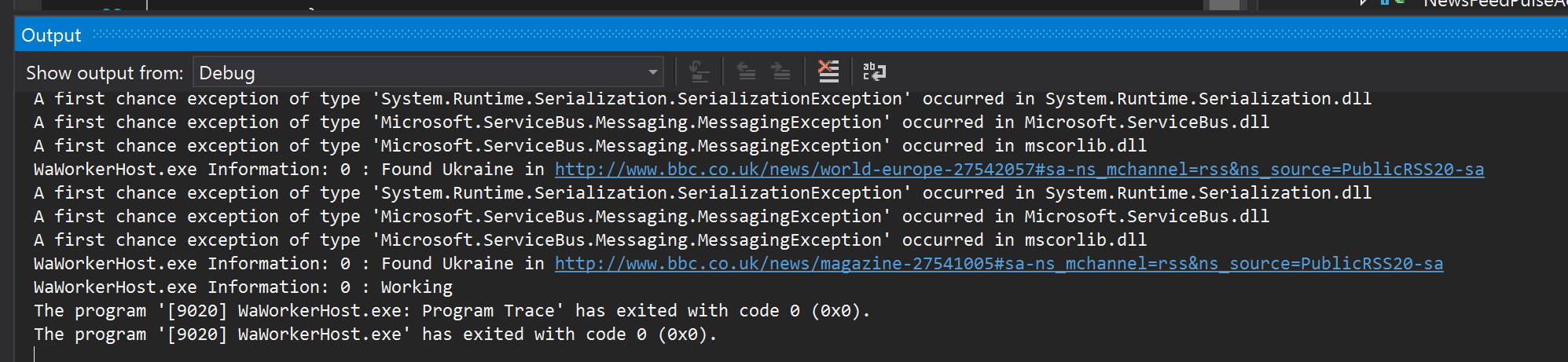
After running the application in debug mode, here is what you see in the output window:
Found Ukraine
Obviously, we can add another actor to subscribe to this event to send email, SMS messages, you name it. Point being, it is a piece of cake. Checking the links, and they indeed are about Ukraine:


And this one:


In the next post, we will discuss another scenario.