Showing posts with label BeeHive. Show all posts

Wednesday, 11 June 2014

BeeHive Series - Part 3: BeeHive 0.5, RabbitMQ and more

Level [T4]

BeeHive is a friction-free library to do Reactor Cloud Actors - effortlessly. It defines abstractions for the message, queue and the actors and all you have to do is to define your actors and connect their dots using subscriptions. If it is the first time you read about BeeHive, you could have a look at previous posts but basically a BeeHive Actor (technically Processor Actor) is very simple:
[ActorDescription("TopicName-SubscriptionName")]
public class MyActor : IProcessorActor
{
  public Task<IEnumerable<Event>> ProcessAsync(Event evnt)
  {
    // impl
  }
}
All you do is to consume a message, do some work and then return typically one, sometimes zero and rarely many events back.
A few key things to note here.

Event

First of all Event, is an immutable, unique and timestamped message which documents a significant business event. It has a string body which normally is a JSON serialisation of actual message object - but it does not have to be.

So usually messages are arbitrary bytes, why here it is a string? While it was possible to use byte[], if you need to send binary blobs or you need custom serialisation, you are probably doing something wrong. Bear in mind, BeeHive is targeted at solutions that require scale, High Availability and linearisation. If you need to attach a big binary blob, just drop it in a key value store using IKeyValueStore and put the link in your message. If it is small, use Base64 encoding. Also your messages need to very simple DTOs (and by simple I do not mean small, but a class with getters and setters), if you are having problem serialising them then again, you are doing something wrong.

Queue naming

BeeHive uses a naming conventional for queues, topics and subscriptions. Basically it is in the format of TopicName-SubscriptionName. So there are a few rules with this:
  • Understandably, TopicName or SubscriptionName should not contain hyphens
  • If the value of TopicName and SubscriptionName is the same, it is a simple queue and not a publish-subscribe queue. For example, "OrderArrived-OrderArrived"
  • If you leave off the SubscriptionName then you are referring to the topic. For example "OrderArrived-".
Queue name is represented by the class QueueName. If you need to construct queue names using static methods:

var n1 = QueueName.FromSimpleQueueName("SimpleQ"); // "SimpleQ-SimpleQ"
var n2 = QueueName.FromTopicName("Topic"); // "Topic-"
var n3 = QueueName.FromTopicAndSubscriptionName("topic", "Sub"); // "Topic-Sub"

There is a QueueName property on the Event class. This property defines where to send the event message. The queue name must be the name of the topic or simple queue name.

IEventQueueOperator

This interface got some make over in this release. I have not been happy the interface as it had some inconsistencies - especially in terms of creating . Thanks to Adam Hathcock who reminded me, now this is done.

With QueueName ability of differentiating topics and simple queue, this value needs to be either name of the simple queue (in the example above "SimpleQ") or the conventional topic name (in the example above "Topic-").

So here is the interface(s) as it stands now:

public interface ISubscriptionOperator<T>
{
    Task<PollerResult<T>> NextAsync(QueueName name);
    Task AbandonAsync(T message);
    Task CommitAsync(T message);
    Task DeferAsync(T message, TimeSpan howLong);
}

public interface ITopicOperator<T>
{
    Task PushAsync(T message);
    Task PushBatchAsync(IEnumerable<T> messages);
}

public interface IQueueOperator<T> : ITopicOperator<T>, ISubscriptionOperator<T>
{
    Task CreateQueueAsync(QueueName name);
    Task DeleteQueueAsync(QueueName name);
    Task<bool> QueueExists(QueueName name);
}

public interface IEventQueueOperator : IQueueOperator<Event>
{
}
Main changes were made to IQueueOperator<T> passing the QueueName which made it simpler.

RabbitMQ Roadmap

BeeHive targets cloud frameworks. IEventQueueOperator and main data structures have been implemented for Azure. Next is AWS.

Amazon Web Services (AWS) provides Simple Queue Service (SQS) which only supports simple send-receive scenarios and not Publish-Subscribe cases. With this in mind, it is most likely that other message brokers will be used although a custom implementation of pub-sub based on Simple Notification Service (SNS) has been reported. Considering RabbitMQ is by far the most popular message broker out there (is it not?) it is sensible to pick this implementation first.

RabbitMQ client for .NET has a very simple API and working with it is very easy. However, the connection implementation has a lot to be desired. EasyNetQ has a sophisticated connection implementation that covers dead connection refreshes and catering for round-robin in case of High-Availability scenario. Using a full framework to just the connection is not really an option hence I need to implement something similar.

So for now, I am realising an alpha version without the HA and connection refresh to get community feedback. So please do ping me what you think.

Since this is a pre-release, you need to use -Pre to get it installed:

PM> Install-Package BeeHive.RabbitMQ -Pre

Monday, 2 June 2014

BeeHive Series - Part 2 - Importing file from blob storage to ElasticSearch sample

[Level T1]

In the previous post, we introduced BeeHive and talked about an example usage where we check news feeds and send a notification if a keyword is found. In this post, we look at another example. You can find the source code in the BeeHive Github repo. Just open up BeeHive.Samples.sln file.

Processing files

Let's imagine we receive files in a particular blob location and we need to import/process them into the system. These files arrive in a particular folder structure and we need to watch the root folder. Then we need to pick them up, extract each row and send each record to be processed - in this case to be loaded onto an ElasticSearch cluster.
ElasticSearch is a horizontally-scalable and highly-available indexing and search technology. It runs on Windows, Linux and OSX, easy to setup and free to use. You can download the installer from http://www.elasticsearch.org/

NewFileArrived

So here, we design a system that watches the location and when it finds the files, it raises NewFileArrived event. This is a simple enough process yet what if we have multiple actors watching the location (very likely for a cloud scenario where the same process runs on many machines)? In this case we will receive multiple NewFileArrived events.
BeeHive provides pulsers that help you with your concurrency problems. FolderWatcherActor can subscribe to a topic that is fed by a pulser. In fact, in a BeeHive world, you could have pulsers that raise events at different intervals and raise events such as FiveMinutesPassedAnHourPassedADayPassed, etc and based on the requirement, your actors could be subscribing to any of these. Beauty ofmessage-based scheduling is that only a single instance of the actor will be receiving the message.
Raising the NewFileArrived event is not enough. When the actor wakes up again by receiving the next message and the file is there, it will send another NewFileArrived error. We can protect against this by:
1) Making processing Idempotent 2) Keep track of files received 3) Mark files by creating a status file next to them
We choose the last option so we can use the same status file further down. So after identifying the file, we create a file with the same name plus .status and write the status number, here 1.

public async Task<IEnumerable<Event>> ProcessAsync(Event evnt)
{
    var events = new List<Event>();
    var items = (await _dynamoStore.ListAsync(
        _configurationValueProvider.GetValue(Constants.SweepRootPathKey)))
        .ToArray();

    var notProcessed = items.Where(x => !x.IsVirtualFolder)
        .GroupBy(z => z.Id.Replace(Constants.StatusPostfix, ""))
        .Where(f => f.Count() == 1)
        .Select(w => w.Single());

    foreach (var blob in notProcessed)
    {
        events.Add(new Event(new NewFileArrived()
        {
            FileId = blob.Id
        }));
        await _dynamoStore.InsertAsync(new SimpleBlob()
        {
            Id = blob.Id + Constants.StatusPostfix,
            Body = new MemoryStream(BitConverter.GetBytes(1)) // status 1
        });
    }

    return events;
}

Process the file: fan-out the records

After receiving the NewFileArrived, we copy the file locally and split the file to the records and fan out the records with ImportRecordExtracted. We also send a ImportFileProcessed event.
public async Task<IEnumerable<Event>> ProcessAsync(Event evnt)
{
    var newFileArrived = evnt.GetBody<NewFileArrived>();
    var blob = await _dynamoStore.GetAsync(newFileArrived.FileId);
    var reader = new StreamReader(blob.Body);
    string line = string.Empty;
    var events = new List<Event>();
    while ((line = reader.ReadLine())!= null)
    {
        var fields = line.Split(new []{','},StringSplitOptions.RemoveEmptyEntries);
        events.Add(new Event( new ImportRecordExtracted()
        {
            Id = fields[0],
            Content = fields[2],
            IndexType = fields[1]
        }));
    }

    events.Add(new Event(new ImportFileProcessed()
    {
        FileId = newFileArrived.FileId
    }));

    return events;
}

ImportFileProcessed

The actor receiving this event will delete the file and the status file.
public async Task<IEnumerable<Event>> ProcessAsync(Event evnt)
{
    var importFileProcessed = evnt.GetBody<ImportFileProcessed>();
    var statusFile = importFileProcessed.FileId + Constants.StatusPostfix;

    await _dynamoStore.DeleteAsync(new SimpleBlob()
    {
        Id = importFileProcessed.FileId
    });
    await _dynamoStore.DeleteAsync(new SimpleBlob()
    {
        Id = statusFile
    });

    return new Event[0];
}

ImportRecordExtracted

Based on the type of the record, we "upsert" the record in the appropriate index in our ElasticSearch cluster.
public async Task> ProcessAsync(Event evnt)
{
    var importRecordExtracted = evnt.GetBody();
    var elasticSearchUrl = _configurationValueProvider.GetValue(Constants.ElasticSearchUrlKey);

    var client = new HttpClient();
    var url = string.Format("{0}/import/{1}/{2}", elasticSearchUrl,
        importRecordExtracted.IndexType,
        importRecordExtracted.Id);
    var responseMessage = await client.PutAsJsonAsync(url, importRecordExtracted);

    if (!responseMessage.IsSuccessStatusCode)
    {
        throw new ApplicationException("Indexing failed. " 
            + responseMessage.ToString());
    }

    return new[]
    {
        new Event(new NewIndexUpserted()
        {
            IndexUrl = url
        }) 
    };
}

NewIndexUpserted

While we currently do not need to know when we add or update an index in the ElasticSearch, this can later be used by other processes, so it is best to provision the event. As we said before, BeeHive events are meaningful business milestones that may or may not be used by your current system.

Here are our indexes when browsing to http://localhost:9200/import/_search

{
  "took" : 2,
  "timed_out" : false,
  "_shards" : {
    "total" : 5,
    "successful" : 5,
    "failed" : 0
  },
  "hits" : {
    "total" : 14,
    "max_score" : 1.0,
    "hits" : [ {
      "_index" : "import",
      "_type" : "D",
      "_id" : "4",
      "_score" : 1.0, "_source" : {"Id":"4","IndexType":"D","Content":"These are controlled by min_term_freq"}
    }, {
      "_index" : "import",
      "_type" : "E",
      "_id" : "9",
      "_score" : 1.0, "_source" : {"Id":"9","IndexType":"E","Content":"There are other parameters such as min_word_length"}
    }, {
      "_index" : "import",
      "_type" : "E",
      "_id" : "11",
      "_score" : 1.0, "_source" : {"Id":"11","IndexType":"E","Content":"In order to give more weight to more interesting terms"}
    }, {
      "_index" : "import",
      "_type" : "A",
      "_id" : "2",
      "_score" : 1.0, "_source" : {"Id":"2","IndexType":"A","Content":"clauses in a bool query of interesting terms extracted from some provided text. "}
    }, {
      "_index" : "import",
      "_type" : "D",
      "_id" : "7",
      "_score" : 1.0, "_source" : {"Id":"7","IndexType":"D","Content":"controlled by percent_terms_to_match. The terms are extracted from like_text "}
    }, {
      "_index" : "import",
      "_type" : "H",
      "_id" : "14",
      "_score" : 1.0, "_source" : {"Id":"14","IndexType":"H","Content":"score times some boosting factor boost_terms."}
    }, {
      "_index" : "import",
      "_type" : "B",
      "_id" : "3",
      "_score" : 1.0, "_source" : {"Id":"3","IndexType":"B","Content":"The interesting terms are selected with respect to their tf-idf scores. "}
    }, {
      "_index" : "import",
      "_type" : "D",
      "_id" : "8",
      "_score" : 1.0, "_source" : {"Id":"8","IndexType":"D","Content":"which is analyzed by the analyzer associated with the field"}
    }, {
      "_index" : "import",
      "_type" : "E",
      "_id" : "10",
      "_score" : 1.0, "_source" : {"Id":"10","IndexType":"E","Content":"max_word_length or stop_words to control what terms should be considered as interesting. "}
    }, {
      "_index" : "import",
      "_type" : "D",
      "_id" : "5",
      "_score" : 1.0, "_source" : {"Id":"5","IndexType":"D","Content":"The number of interesting terms is controlled by max_query_terms. "}
    } ]
  }
}


Cleanup processes

In the absence of transactions, business processes have to design the processes for failure. BeeHive promotes an approach that every process is broken down to its smallest elements and each implemented in an actor.

Sometimes it is necessary to design processes that look for the highly unlikely (yet possible) event of a failure when actor has done its work but the events returned never make it back to the service bus. In the case of inserting the new index, this is not a problem since we use PUT and the process is idempotent. However, this could be a problem in case of processing file where a status file is created but NewFileArrived never makes it back to the service bus. In this case, a crash unlocker process that checks the timestamp of the status file and deletes the file if older than e.g. 1 day, is all that is needed.

Conclusion

We can use pulsers to solve the inherent concurrency problem of multiple folder watcher actors watching the same folder. The fan-out process of breaking a file down to its record and parallilising the processing is one of the key benefits of cloud actors.


Thursday, 22 May 2014

BeeHive Series - Part 1 - Getting started with BeeHive

[Level T1]

I feel that BeeHive has been the most important Open Source project I have been involved so far. Not because it is my latest project, but because I feel the potential is huge.

The infoq article that came out on Monday is pretty much a theoretical braindump on the Reactor Actor Model. I had expected this to stir up so much controversy as the claims I am making are pretty big - this has not happened yet. Maybe the text does not flow well or it is just early. In any case, the idea is clear: sticking to Processor Actors and build a web of loosely connected events to fulfil a system's business requirement while maintaining fluid evolvability. However, I fear the article was perhaps too dry and long and did not fully demonstrate the potential.

Hence I have set out to start a series on BeeHive and show the idea in some tangible scenarios "Show me the codz" - with the code easily accessible from GitHub. So now let's roll on.

BeeHive

BeeHive makes it ridiculously simple (and not necessarily easy) to build decoupled actors that together achieve a business goal. By using topic-based subscription, you can easily add actors that feed on an existing event and do something extra.
Here we will build such systems will a few lines of code. You can find the full solution in the samples folder in the source. The code below is mainly is a snippet (e.g does not have the Dispose() methods for removing clutter).

Scenario 1: News Feed Keyword Notification

Let's imagine you are interested in to know all breaking news from one or several news feeds and would like to be notified when a certain keyword occurs in the news. In this case we design a series of reactive actors that achieve this while allowing for other functionality to be built on top of existing topic based queues. We use Windows Azure for this example. In order to achieve this we need to regularly (e.g. every 5 minutes), check the news feed (RSS, ATOM, etc) and examine new items arrived and look for the interested keyword(s) and then perhaps tweet, send email or SMS text.

Pulsers: Activities on regular intervals

BeeHive works on a reactive event-based model. Instead of building components that regularly do some work, we can have generic components that regularly fire an event. These events then can be subscribed to by one or more actors to fire off the processing by a chain of decoupled actors.
BeeHive Pulsers do exactly that. On regular intervals, they are woken up to fire off their events. Simplest of pulsers, are assembly attribute ones:
[assembly: SimpleAutoPulserDescription("NewsPulse", 5 * 60)]
The code above sets up a pulser that every 5 minutes sends an event of type NewsPulse with empty body.

Dissemination from a list: Fan-out pattern

Next we set up an actor to look up a list of feeds (one per each line) and send an event per each feed. We have stored this list in a blob storage which is abstracted as IKeyValueStore in BeeHive.
[ActorDescription("NewsPulse-Capture")]
public class NewsPulseActor : IProcessorActor
{
  private IKeyValueStore _keyValueStore;
  public NewsPulseActor(IKeyValueStore keyValueStore)
  {
    _keyValueStore = _keyValueStore;
  }
  public async Task<IEnumerable<Event>> ProcessAsync(Event evnt)
  {
    var events = new List<Event>();
    var blob = await _keyValueStore.GetAsync("newsFeeds.txt");
    var reader = new StreamReader(blob.Body);
    string line = string.Empty;
    while ((line = reader.ReadLine())!=null)
    {
      if (!string.IsNullOrEmpty(line))
      {
        events.Add(new Event(new NewsFeedPulsed(){Url = line}));
      }
    }
    return events;
  }
}
ActorDescription attribute used above signifies that the actor will receive its events from the Capture subscription of the NewsPulse topic. We will be setting up all topics later using a single line of code.
So we are publishing NewsFeedPulsed event for each news feed. When we construct an Event object using the typed event instance, EventType and QueueName will be set to the type of the object passed - which is the preferred approach for consistency.

Feed Capture: another Fan-out

Now we will be consuming these events in the next actor in the chain. NewsFeedPulseActor will subscribe to NewsFeedPulsed event and will use the URL to get the lastest RSS feed and look for latest news. To prevent from duplicate notifications, we need to know what was the most recent tem we checked last time. We will store this offset in a storage. For this use case, we choose ICollectionStore<T> which its Azure implementation uses Azure Table Storage.
[ActorDescription("NewsFeedPulsed-Capture")]
public class NewsFeedPulseActor : IProcessorActor
{
    private ICollectionStore<FeedChannel> _channelStore;
    public NewsFeedPulseActor(ICollectionStore<FeedChannel> channelStore)
    {
        _channelStore = channelStore;
    }
    public async Task<IEnumerable<Event>> ProcessAsync(Event evnt)
    {
      var newsFeedPulsed = evnt.GetBody<NewsFeedPulsed>();
      var client = new HttpClient();
      var stream = await client.GetStreamAsync(newsFeedPulsed.Url);
      var feedChannel = new FeedChannel(newsFeedPulsed.Url);
      var feed = SyndicationFeed.Load(XmlReader.Create(stream));
      var offset = DateTimeOffset.MinValue;
      if (await _channelStore.ExistsAsync(feedChannel.Id))
      {
        feedChannel = await _channelStore.GetAsync(feedChannel.Id);
        offset = feedChannel.LastOffset;
      }
      feedChannel.LastOffset = feed.Items.Max(x => x.PublishDate);
      await _channelStore.UpsertAsync(feedChannel);
      return feed.Items.OrderByDescending(x => x.PublishDate)
        .TakeWhile(y => offset < y.PublishDate)
        .Select(z => new Event(new NewsItemCaptured(){Item = z}));
    }
  }
}
Here we read the URL from the event and capture the RSS and then get the last offset from the strorage. We then send the captured feed items back as events for whoever is interested. At the end, we set the offset.

Keyword filtering and Notification

At this stage we need to subscribe to NewsItemCaptured and check the content for specific keywords. This is only one potential subscription out of many. For example one actor could be subscribing to the event to store these for further retrieval, another to process for trend analysis, etc.
So for the sake of simplicity, let's hardcode the keyword (in this case "Ukraine") but it could have been equally loaded from a storage or a file - as we did with the list of feeds.
[ActorDescription("NewsItemCaptured-KeywordCheck")]
public class NewsItemKeywordActor : IProcessorActor
{
    private const string Keyword = "Ukraine";
    public async Task<IEnumerable<Event>> ProcessAsync(Event evnt)
    {
        var newsItemCaptured = evnt.GetBody<NewsItemCaptured>();
        if (newsItemCaptured.Item.Title.Text.ToLower()
            .IndexOf(Keyword.ToLower()) >= 0)
        {
            return new Event[]
            {
                new Event(new NewsItemContainingKeywordIentified()
                {
                    Item = newsItemCaptured.Item,
                    Keyword = Keyword
                }),
            };
        }
        return new Event[0];
    }
}
Now we can have several actors listening for NewsItemContainingKeywordIentified and send different notifications, here we implement a simple Trace-based one:

[ActorDescription("NewsItemContainingKeywordIentified-TraceNotification")]
public class TraceNotificationActor : IProcessorActor
{
  public async Task<IEnumerable<Event>> ProcessAsync(Event evnt)
  {
    var keywordIentified = evnt.GetBody<NewsItemContainingKeywordIentified>();
    Trace.TraceInformation("Found {0} in {1}",
        keywordIentified.Keyword, keywordIentified.Item.Links[0].Uri);
    return new Event[0];
  }
}

Setting up the worker role

If you have an Azure account, you need a storage account, Azure Service Bus and a worker role (even an Extra Small instance would suffice). If not, you can use development emulators although for the Service Bus you need to use Service Bus for windows. Just bear in mind, with local emulators and Service Bus for Windows, you have to use special versions of Azure SDK - latest versions usually do not work.
We can get a list of assembly pulsers by the code below:

_pulsers = Pulsers.FromAssembly(Assembly.GetExecutingAssembly())
    .ToList()

Also we need to create an Orchestartor to set up factory actors. We need to call SetupAsync() to set up all the topics and subscriptions.
Also we need to register our classes against Dependency Injection framework.

Now we are ready!

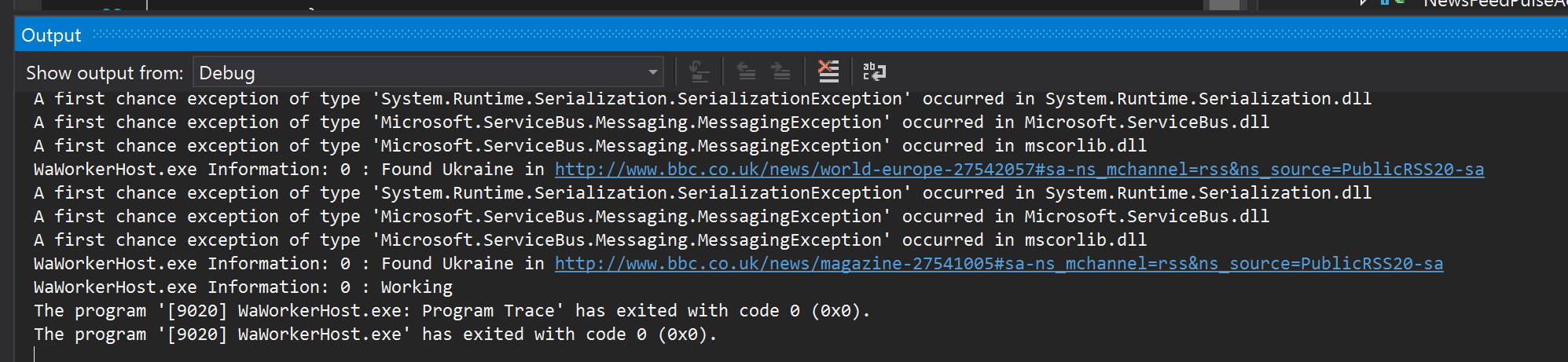
After running the application in debug mode, here is what you see in the output window:
Found Ukraine
Obviously, we can add another actor to subscribe to this event to send email, SMS messages, you name it. Point being, it is a piece of cake. Checking the links, and they indeed are about Ukraine:


And this one:


In the next post, we will discuss another scenario.

Sunday, 13 April 2014

Reactive Cloud Actors: no-nonsense MicroServices

[Level C3]

This post is not directly about MicroServices. If that is why you are reading it, might as well stop now. Apparently, we are still waiting as for the definition to be finally ratified. The definition, as it stands now, is blurry - Martin Fowler admits. This post is about Actors - the cloud ones - you know. After finishing reading it, I hope I have made it effortlessly clear how Reactive Cloud Actors are the real MicroServices, rather than albeit light RESTful Imperative MicroServices.

Watching Fred George delivering an excellent talk on High-Performance Bus inspired me to start working on the actors. I am still working on a final article on the subject but this post is basically a primer on that - as well as announcement of BeeHive mini-framework. The next section on actors is taken from that article which covers the essential theoretical background. Before we start, let's make it clear that the term Reactive is not used in the context of Reactive Extensions (Rx) or Frameworks, only in contrast to imperative (RPC-based) actors. Also RPC-based is not used in contrast to RESTful, but it simply means a system which relies on command and query messages rather than events.

UPDATE: The article is now published on infoq here

Actors

Carl Hewitt, along with Peter Bishop and Richard Steiger, published an article back in 1973 that proposed a formalism that identified a single class of objects, i.e. Actors, as the building blocks of systems designed to implement Artificial Intelligence algorithms.

According to Hewitt an actor, in response to a message, can:
  1. Send a finite number of messages to other actors
  2. create a finite number of other actors
  3. decide on the behaviour to be used for the next message it receives
Any combination of these actions can occur concurrently and in response to messages arriving in any order - as such, there is no constraint with regard to ordering and an actor implementation must be able to handle messages arriving out of band. However, I believe it is best to separate these responsibilities as below.

Processor Actor

In a later description of the Actor Model, first constraint is re-defined as "send a finite number of messages to the address of other actors". Addressing is an integral part of the model that decouples actors and limits the knowledge of actors from each other to mere a token (i.e. address). Familiar implementation of addressing includes Web Services endpoints, Publish/Subscribe queue endpoints and email addresses. Actors that respond to a message by using the first constraint can be called Processor Actors.

Factory Actor

Second constraint makes actors capable of creating other actors that we conveniently call Factory Actors. Factory actors are important elements of a message-driven system where an actor is consuming from a message queue and create handlers based on the message type. Factory actors control the lifetime of the actors they create and have a deeper knowledge of the actors they create - compared to processor actors knowing mere an address. It is useful to separate factory actors from processing ones - in line with the single responsibility principle.

Stateful Actor

Third constraint is the Stateful Actor. Actors capable of the third constraint have a memory that allows them to react differently on subsequent messages. Such actors can be subject to a myriad of side-effects. Firstly, when we talk about "subsequent messages" we inherently assume an ordering while as we said, there is no constraint with regard to ordering: an out of band message arrival can lead to complications. Secondly, all aspects of CAP applies to this memory making a consistent yet highly available and partition tolerant impossible to achieve. In short, it is best to avoid stateful actors.

Modelling a Processor Actor

"Please open your eyes, Try to realise, I found out today we're going wrong, We're going wrong" - Cream
[Mind you there is only a glimpse of Ginger Baker visible while the song is heavily reliant on Ginger's drumming. And yeah, this goes back to a time when Eric played Gibson and not his signature Strat]


This is where most of us can go wrong. We do that, sometimes for 4 years - without realising it. This is by no means a reference to a certain project [... cough ... Orleans ... cough] that has been brewing (Strange Brew pun intended) for 4 years and coming up with an imperative, RPC-based, RESTfully coupled Micro-APIs. We know it, doing simple is hard - and we go wrong, i.e. we do the opposite: build really complex frameworks. 

I was chatting away on twitter with a few friends and I was saying "if you need a full-blown and complex framework to do actors, you are probably doing it wrong". All you need is a few interfaces, and some helpers doing the boilerplate stuff. This stuff ain't no rocket science, let's not turn it into.

The essence of the Reactive Cloud Actor is the interface below (part of BeeHive mini-framework introduced below):
    /// <summary>
    /// Processes an event.
    /// 
    /// Queue name containing the messages that the actor can process messages of.
    /// It can be in the format of [queueName] or [topicName]-[subscriptionName]
    /// </summary>
    public interface IProcessorActor : IDisposable
    {
        /// <summary>
        /// Asynchrnous processing of the message
        /// </summary>
        /// <param name="evnt">Event to process</param>
        /// <returns>Typically contains 0-1 messages. Exceptionally more than 1</returns>
        Task<IEnumerable<Event>> ProcessAsync(Event evnt);

    }

Yes, that is all. All of your business can be captured by the universal method above. Don't you believe that? Just have a look a non-trivial eCommerce example implemented using this single method.

So why Reactive (Event-based) and not Imperative (RPC-based)? Because in a reactive actor system, each actor only knows about its own Step and what itself does and has no clue about the next steps or the rest of the system - i.e. actors are decoupled leading to independence which facilitates actor Application Lifecycle Management and DevOps deployment.
As can be seen above, Imperative actors know about their actor dependencies while Reactive actors have no dependency other than the queues, basic data structure stores and external systems. Imperative actors communicate with other actors via a message store/bus and invoke method calls. We have been this for years, in different Enterprise Service Bus integrations, this one only brings it to a micro level which makes the pains event worse.

So let's bring an example: fraud check of an order.

Imperative
PaymentActor, after a successful payment for an order, calls the FraudCheckActor. FraudCheckActor calls external fraud check systems. After identifying a fraud, it calls CancelOrderActor to cancel the order. So as you can see, PaymentActor knows about and depends on FraudCheckActor. In the same way, FraudCheckActor depends on CancelOrderActor. They are coupled.

Reactive
PaymentActor, upon successful payment, raises PaymentAuthorised event. FraudCheckActor is one of its subscribers and after receiving this event checks for fraud and if one detected, raises FraudDetected event. CancelOrderActor subscribers to some events, including FraudDetected upon receiving which it cancels the order. None of these actors know about the other. They are decoupled.

So which one is better? By the way, none of this is new - we have been doing it for years. But it is important to identify why we should avoid the first and not to "go wrong".

Reactive Cloud Actors proposal


After categorising the actors, here I propose the following constraints for Reactive Cloud Actors:
  • A reactive system that communicates by sending events
  • Events are defined as a time-stamped, immutable, unique and eternally-true piece of information
  • Events have types
  • Events are stored in a Highly-Available cloud storage queues allowing topics
  • Queues must support delaying
  • Processor Actors react to receiving a single and then do some processing and then send back usually one (sometimes zero and rarely more than one) event
  • Processor Actors have type - implemented as a class
  • Processing should involve minimal number of steps, almost always a single step
  • Processing of the events are designed to be Idempotent
  • Each Processor Actor can receive one or more event types - all of which defined by Actor Description
  • Factory Actors responsible for managing the lifetime of processor actors
  • Actors are deployed to cloud nodes. Each node contains one Factory Actor and can create one or more Processor Actor depending on its configuration. Grouping of actors depends on cost vs. ease of deployment.
  • In addition to events, there are other Basic Data Structures that contain state and are stored in Highly-Available cloud storage (See below on Basic Data Structures)
  • There are no Stateful Actors. All state is managed by the Basic Data Structures and events.
  • This forms an evolvable web of events which can define flexible workflows
Breaking down all the processes into single steps is very important. A Highly-Available yet Eventually-Consistent system can handle delays but cannot easily bind multiple steps into a single transaction.

So how can we implement this? Is this gonna work?

Introducing BeeHive


 BeeHive is a vendor-agnostic Reactive Actor mini-framework I have been working over the last three months. It is implemented in C# but frankly could be done in any language supporting Asynchronous programming (promises) such as Java or node.

The cloud implementation has been only implemented for Azure but implementing another cloud vendor is basically implementing 4-5 interfaces. It also comes with an In-Memory implementation too which is only targeted at implementing demos. This framework is not meant to be used as an in-process actor framework.

It implements Prismo eCommerce example which is an imaginary eCommerce system and has been implemented for both In-Memory and Azure. This example is non-trivial has some tricky scenarios that have to implement Scatter-Gather sagas. There is also a Boomerang pattern event that turns a multi-step process into regurgitating an event a few times until all steps are done (this requires another post).

An event is model as:

[Serializable]
public sealed class Event : ICloneable
{

    public static readonly Event Empty = new Event();

    public Event(object body)
        : this()
    {        
       ...
    }

    public Event()
    {
        ...
    }

    /// <summary>
    /// Mrks when the event happened. Normally a UTC datetime.
    /// </summary>
    public DateTimeOffset Timestamp { get; set; }

    /// <summary>
    /// Normally a GUID
    /// </summary>
    public string Id { get; private set; }

    /// <summary>
    /// Optional URL to the body of the message if Body can be retrieved 
    /// from this URL
    /// </summary>
    public string Url { get; set; }

    /// <summary>
    /// Content-Type of the Body. Usually a Mime-Type
    /// Typically body is a serialised JSON and content type is application/[.NET Type]+json
    /// </summary>
    public string ContentType { get; set; }
        
    /// <summary>
    /// String content of the body.
    /// Typically a serialised JSON
    /// </summary>
    public string Body { get; set; }

    /// <summary>
    /// Type of the event. This must be set at the time of creation of event before PushAsync
    /// </summary>
    public string EventType { get; set; }

    /// <summary>
    /// Underlying queue message (e.g. BrokeredMessage in case of Azure)
    /// </summary>
    public object UnderlyingMessage { get; set; }

    /// <summary>
    /// This MUST be set by the Queue Operator upon Creation of message usually in NextAsync!!
    /// </summary>
    public string QueueName { get; set; }


    public T GetBody<T>()
    {
       ...
    }

    public object Clone()
    {
        ...
    }
}

As can be seen, Body has been defined as a string since BeeHive uses JSON serialisation. This can be made flexible but in reality events should normally contain small amount of data and mainly basic data types such as GUID, integer, string, boolean and DateTime. Any binary data should be stored in Azure Blob Storage or S3 and then path referenced here.

BeeHive Basic Data Structures

This is a work-in-progress but nearly done part of the BeeHive to define a minimal set of Basic Data Structures (and their stores) to cover all required data needs of Reactive Actors. These structures are defined as interfaces that can be implemented for different cloud platforms. This list as it stands now:
  • Topic-based and simple Queues
  • Key-Values
  • Collections
  • Keyed Lists
  • Counters

Some of these data structures hold entities within the system which should implement a simple interface:

public interface IHaveIdentity
{
    Guid Id { get; }
}

Optionally, entities could be Concurrency-Aware for updates and deletes in which case they will implement an additional interface:

public interface IConcurrencyAware
{
    DateTimeOffset? LastModofied { get; }

    string ETag { get; }
}


Prismo eCommerce sample

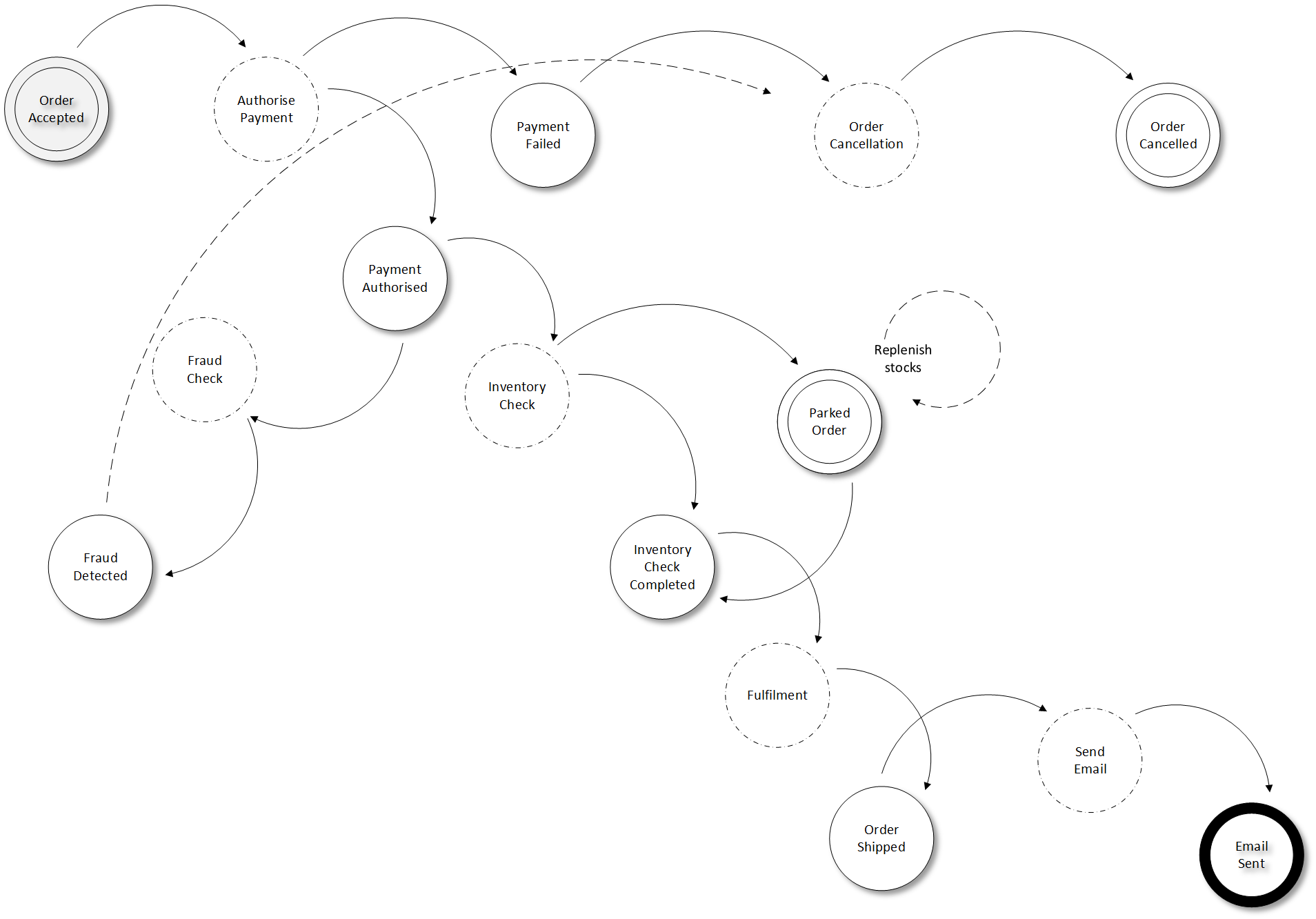
Prismo eCommerce is an imaginary eCommerce company that receives orders and processes them. The order taking relies on an eventually consistent (and delayed) read model of the inventory hence orders can be accepted for which items are out of stock. Process waits until all items are in stock or if out of stock, they arrive back in stock until it sends them to fulfilment. 

Prismo eCommerce states (solid), transitions (arrows) and processes (dashed)

This sample has been implemented both In-Memory and for Windows Azure. In both cases, the tracing can be used to see what is happening outside. In this sample all actors are configured to run in a single worker role, although they can each run in their own roles. I might provide a UI to show the status of each order as they go through statuses.

Conclusion

Reactive Cloud Actors are the way to implement decoupled MicroServices. By individualising actor definitions (Processor Actor and Factory Actor) and avoiding Stateful Actors, we can build resilient and Highly Available cloud based systems. Such systems will comprise a evolvable webs of events which each web defines a business capability. I don't know about you but this is how I am going to build my cloud systems.

Watch the space, the article is on its way.